1.5 Years
Fastex Exchange Admin Panel
An internal operational platform behind a crypto exchange, used to manage customers, trading products, financial activity, compliance workflows, platform configuration, and other day-to-day exchange operations.
Domain
Time
My role

As the exchange expanded, the back office had to support more products, data, roles, and operational workflows than the legacy solution was designed for. Some recurring processes still depended on manual work or engineering support: managers exported CSV files and assembled reports for leadership, customer investigations required navigating across different product areas, and notification changes had to be implemented manually by developers.
Build a scalable operational platform that gives internal teams direct access to the data, context, and controls they need to run the exchange — while reducing repetitive manual work and dependency on engineering for everyday operations.
Results
The work moved several recurring operational workflows from manual or developer-dependent processes into self-service back-office tools. • replaced recurring CSV-based reporting and ad-hoc developer data requests with dedicated operational dashboards; • consolidated customer data, product activity, analytics, and account-level controls into a shared workspace, making customer investigations faster and reducing context switching; • moved routine notification configuration from development into the back office, allowing authorized managers to control events, triggers, templates, and delivery channels directly; • created reusable structures for customer operations and notification management that could grow as new exchange products and operational scenarios were introduced.
My role
I owned product design for the back office across both existing and new operational workflows. My work included understanding business and operator requirements, structuring complex entities and workflows, defining information architecture, permissions and states, exploring solutions, designing final interfaces, and supporting implementation with product and engineering teams. I also proposed product improvements when I saw opportunities to remove recurring manual work — including introducing dedicated analytics dashboards and turning notification management into a self-service system.
Platform context
One platform, many operational domains
The back office was the operational layer behind the exchange. Different teams worked with customer data, transactions, Spot, Futures, P2P, funds, compliance, currencies, administration, engagement products, and platform settings — each with its own data structures, permissions, risks, and daily workflows.
Rather than treating every section as a separate tool, I worked toward shared patterns while keeping domain-specific workflows aligned with the decisions operators actually needed to make.

Turning manual reporting into self-service analytics
Problem
Managers responsible for different areas of the exchange needed recurring data for daily monitoring and management reporting. Much of this work involved exporting CSV files, requesting additional data from developers, and manually assembling reports for leadership.
Besides being repetitive, this process made it harder to notice meaningful changes in exchange performance quickly.
My approach
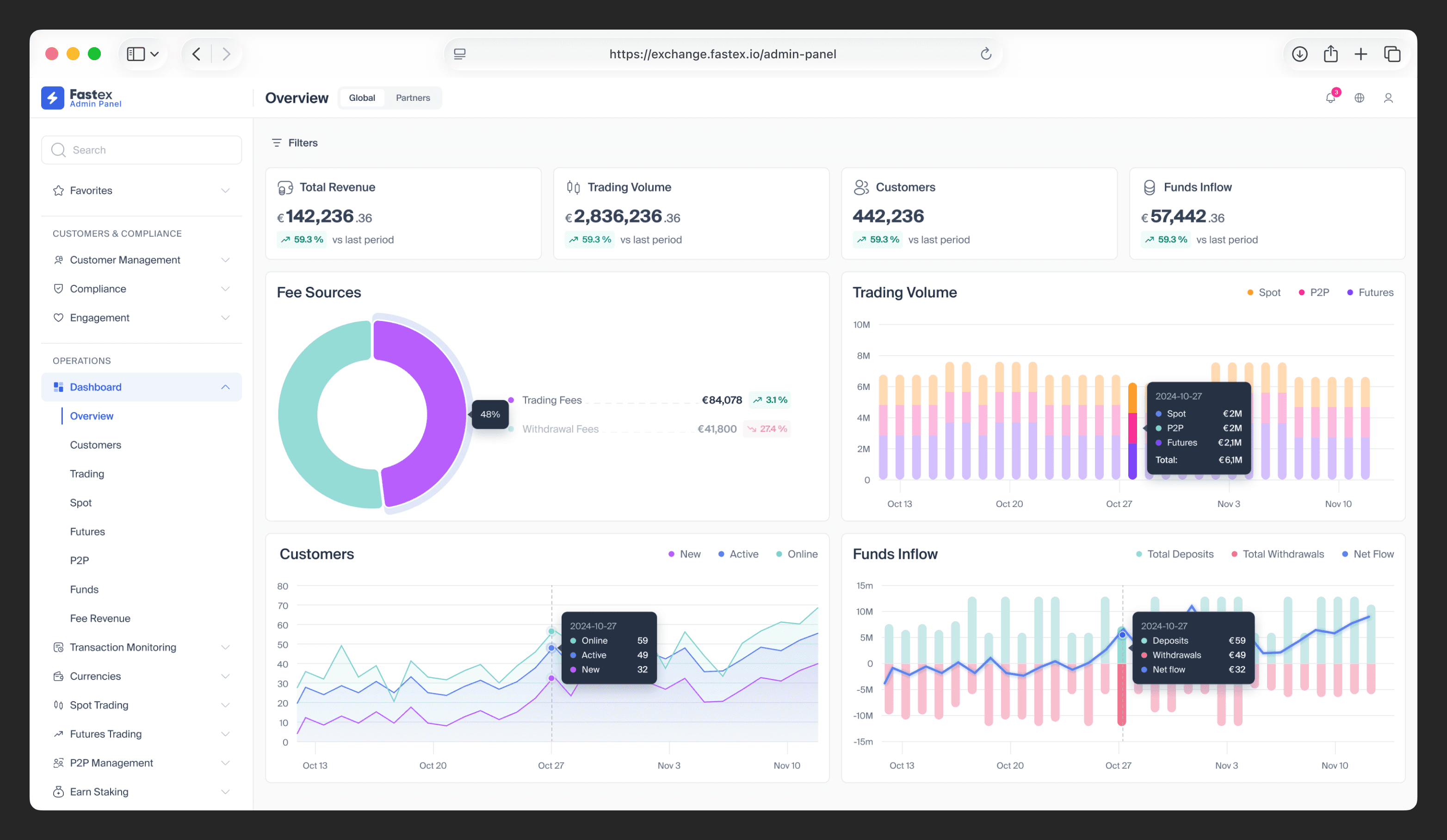
I proposed dedicated dashboards for the product areas where data was important to everyday operations. Instead of creating one generic analytics page, I structured each dashboard around the questions and decisions relevant to that part of the exchange.
The analytics covered Overview, Customers, Trading, Spot, Futures, P2P, Funds, and Fee Revenue, combining high-level metrics with trends, breakdowns, filters, and deeper context where needed.
Design decision
The goal was not to expose as much data as possible. I prioritized the indicators managers needed to assess first and kept secondary information available for deeper investigation, so dashboards could support both quick monitoring and detailed analysis.
Impact
The dashboards replaced a significant part of the recurring CSV-based reporting workflow and gave operations, compliance, finance, trading, and other managers direct access to data they previously had to collect manually or request from developers.
This reduced dependency on ad-hoc reporting and made abnormal changes in operational and business metrics easier to identify and investigate earlier.
Creating one operational workspace around the customer
Problem
A single customer could interact with many parts of the exchange, while different specialists were responsible for areas such as trading, P2P, funds, compliance, and account management.
Investigating a customer often meant reconstructing their current state from multiple parts of the back office before an operator could understand what had happened and decide what to do next.
My approach
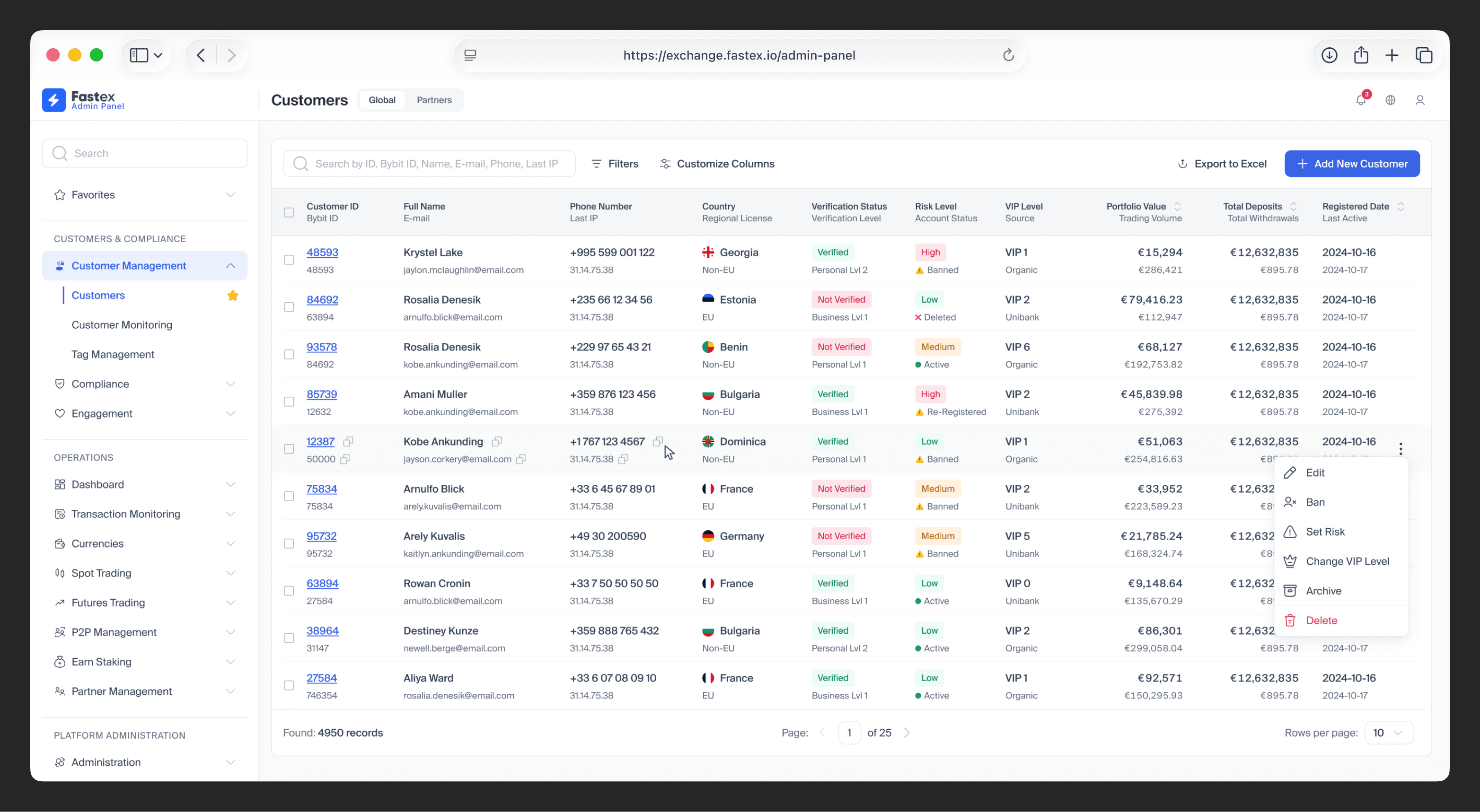
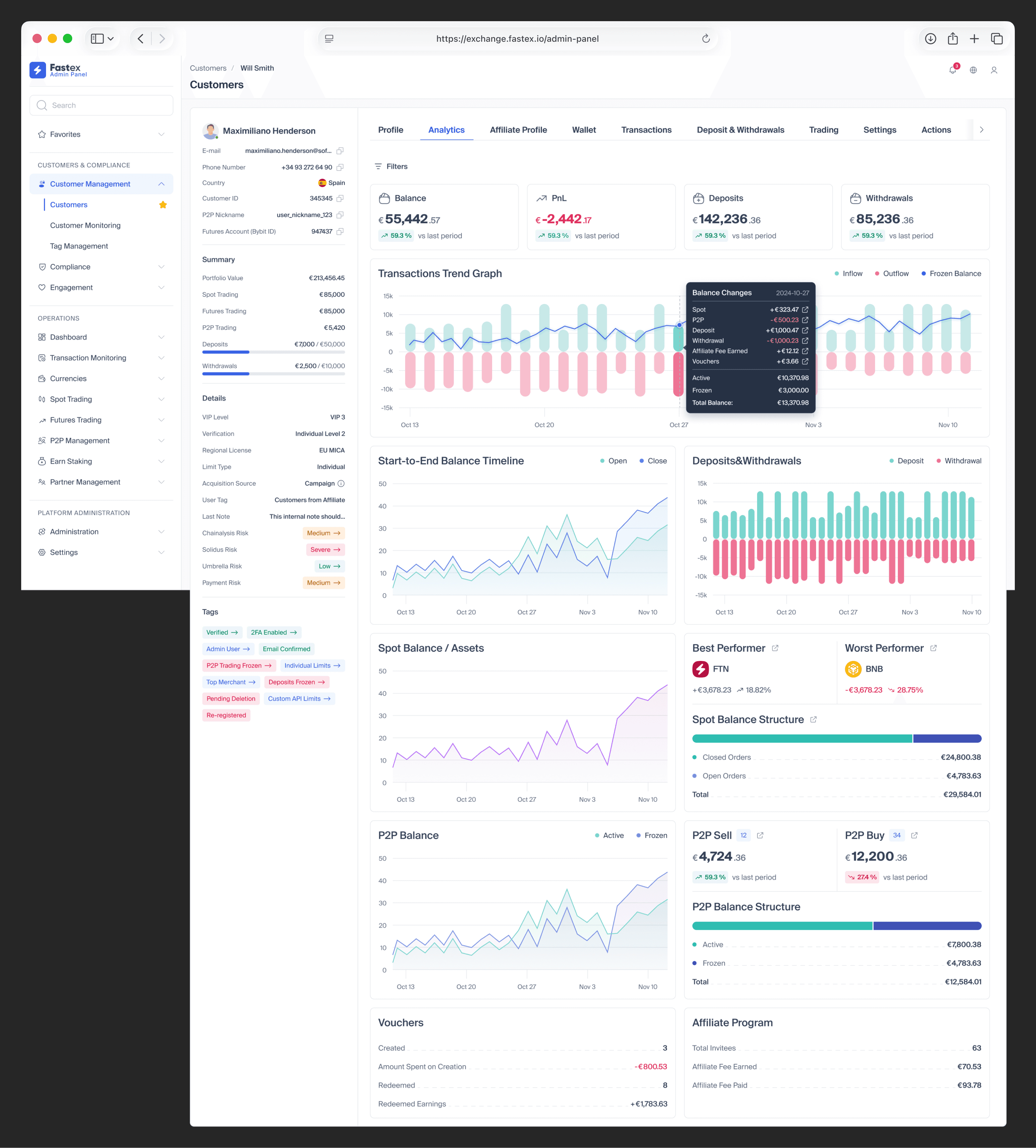
I designed the customer profile as an operational workspace rather than a static profile page. The goal was to keep the customer as the main context while bringing related data, activity, and controls into one predictable structure.
Structure
The workspace included Profile, Analytics, Wallet, Transactions, Deposits & Withdrawals, Spot, Futures, P2P, Settings, Actions, and Notes.
This allowed specialists to move from a general customer overview into the product area relevant to their task without losing the customer context.
Managing sensitive actions
Account-level controls also had very different purposes and levels of risk. I grouped actions by operational context — such as Risk, Business, and Trading — and surfaced their current states directly in the interface.
For example, risk-related controls included account restrictions, individual limits, risk levels, two-factor authentication, customer tags, and account access controls. This made the available action and the customer’s current state visible before an operator changed anything.
Impact
The profile made customer investigations faster by bringing account state, financial activity, product usage, notes, and administrative controls into one shared context.
It reduced unnecessary navigation between unrelated areas and established a reusable customer-management structure that could accommodate new exchange products and operational controls as the platform evolved.
Turning notification management into a self-service system
Problem
Notification events and templates were managed manually by developers. Updating a message, adding a new event, changing delivery behavior, or supporting notifications for a new exchange feature required engineering involvement.
As the exchange expanded across more products and communication channels, this approach became increasingly difficult to maintain and scale.
My approach
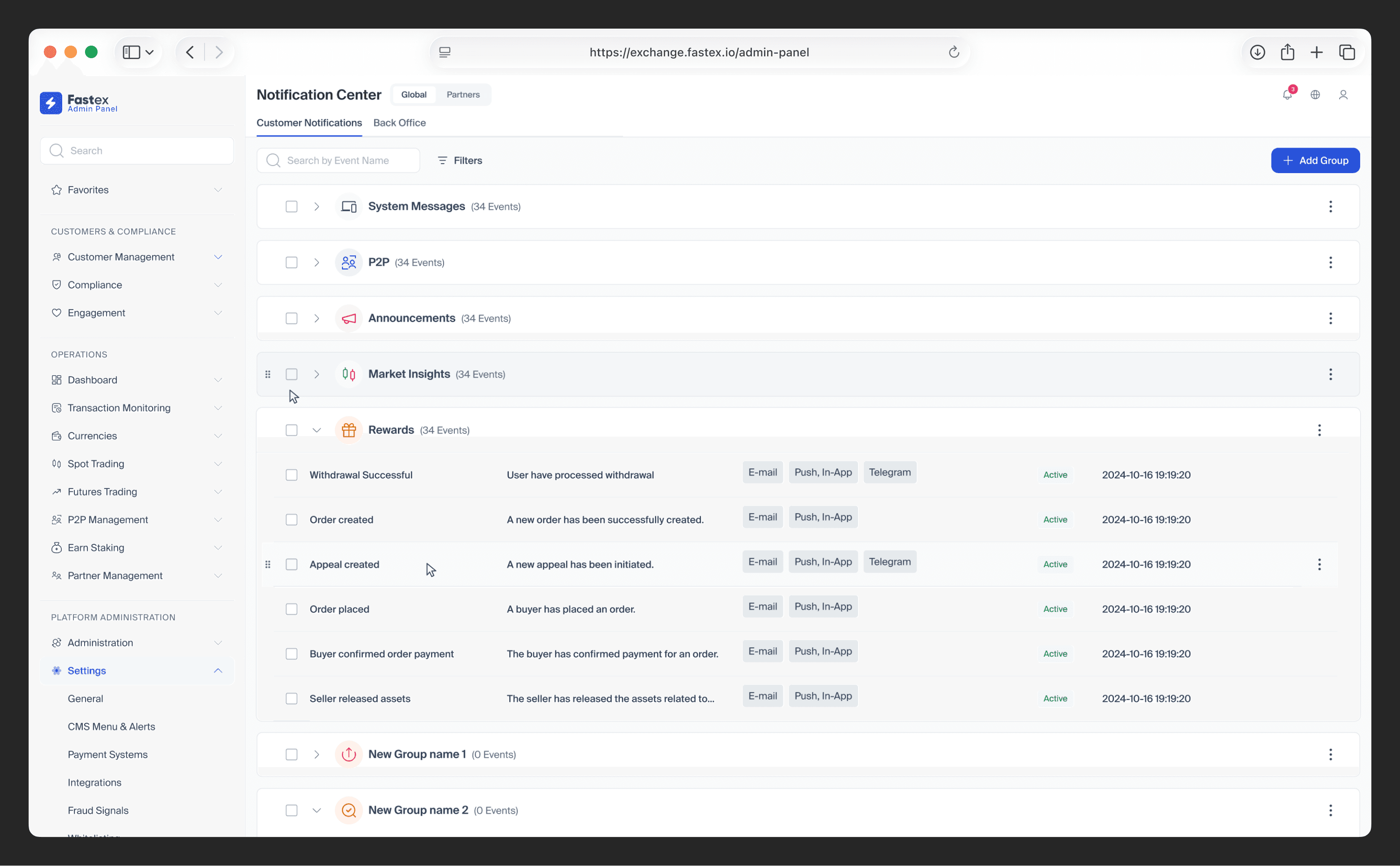
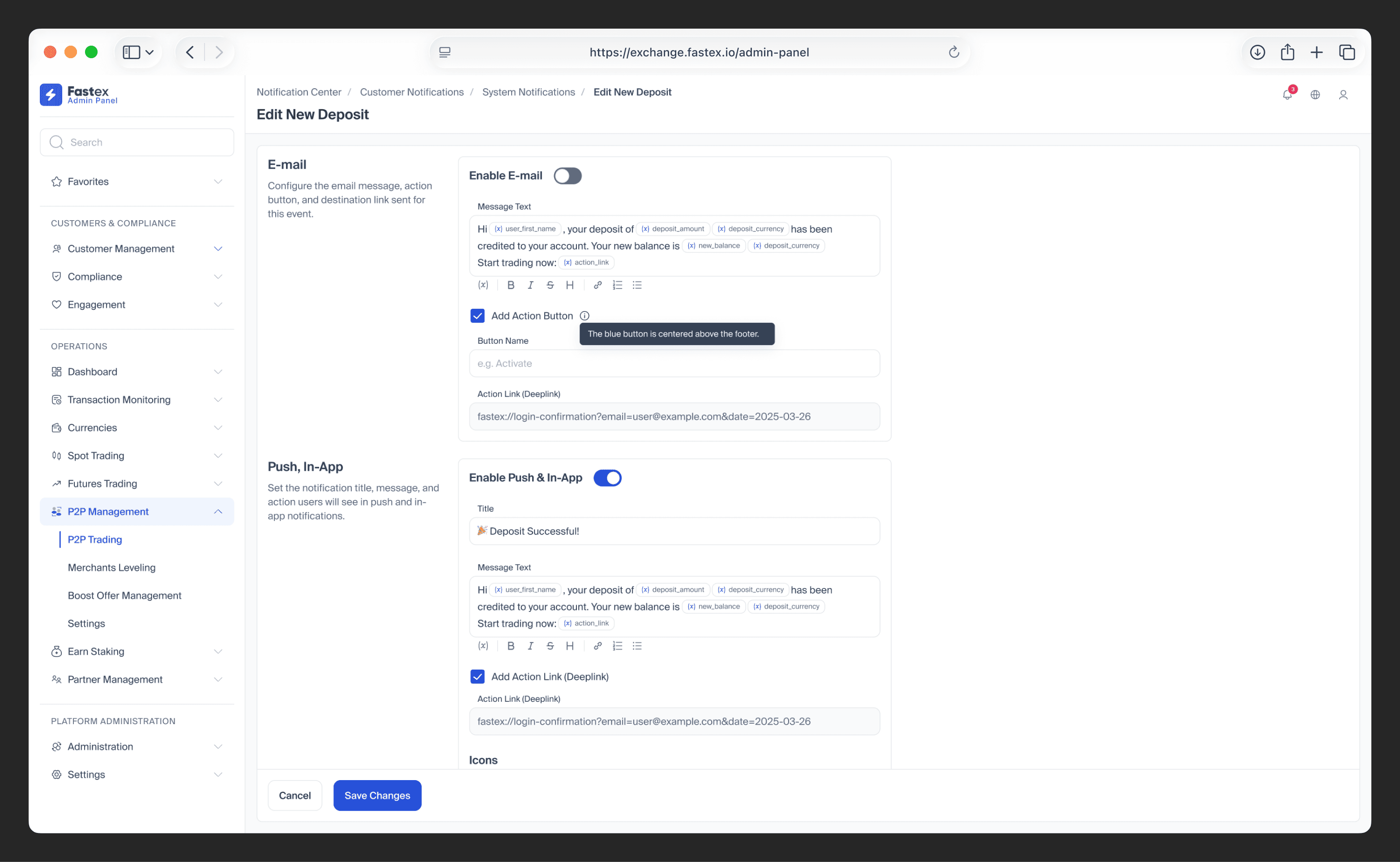
I designed a centralized notification-management model built around events, groups, triggers, templates, and delivery channels.
Instead of configuring every notification as an isolated technical entity, administrators could organize events into groups, move them between groups, define trigger behavior, and manage related communication from the same system.
Multi-channel configuration
Each event could be configured across E-mail, Push/In-App, and Telegram, with channel-specific message content, variables, action links, and visual assets where needed.
Keeping related channels inside the same configuration flow made it easier to understand how one event would communicate across the exchange instead of managing each channel in isolation.
Flexible event structure
The grouping model also allowed administrators to reorganize notification events through direct interaction and extend the configuration as new products, event types, and communication needs appeared.
Impact
The system moved routine notification configuration from development into the back office, allowing authorized managers to make everyday communication changes without relying on developers or waiting for a product release.
Centralizing related templates and channel settings reduced the risk of inconsistent messaging across E-mail, Push/In-App, and Telegram.
The event–group–trigger model also created a reusable foundation for adding new exchange products and notification types without redesigning the management experience each time.
Supporting operational work beyond desktop
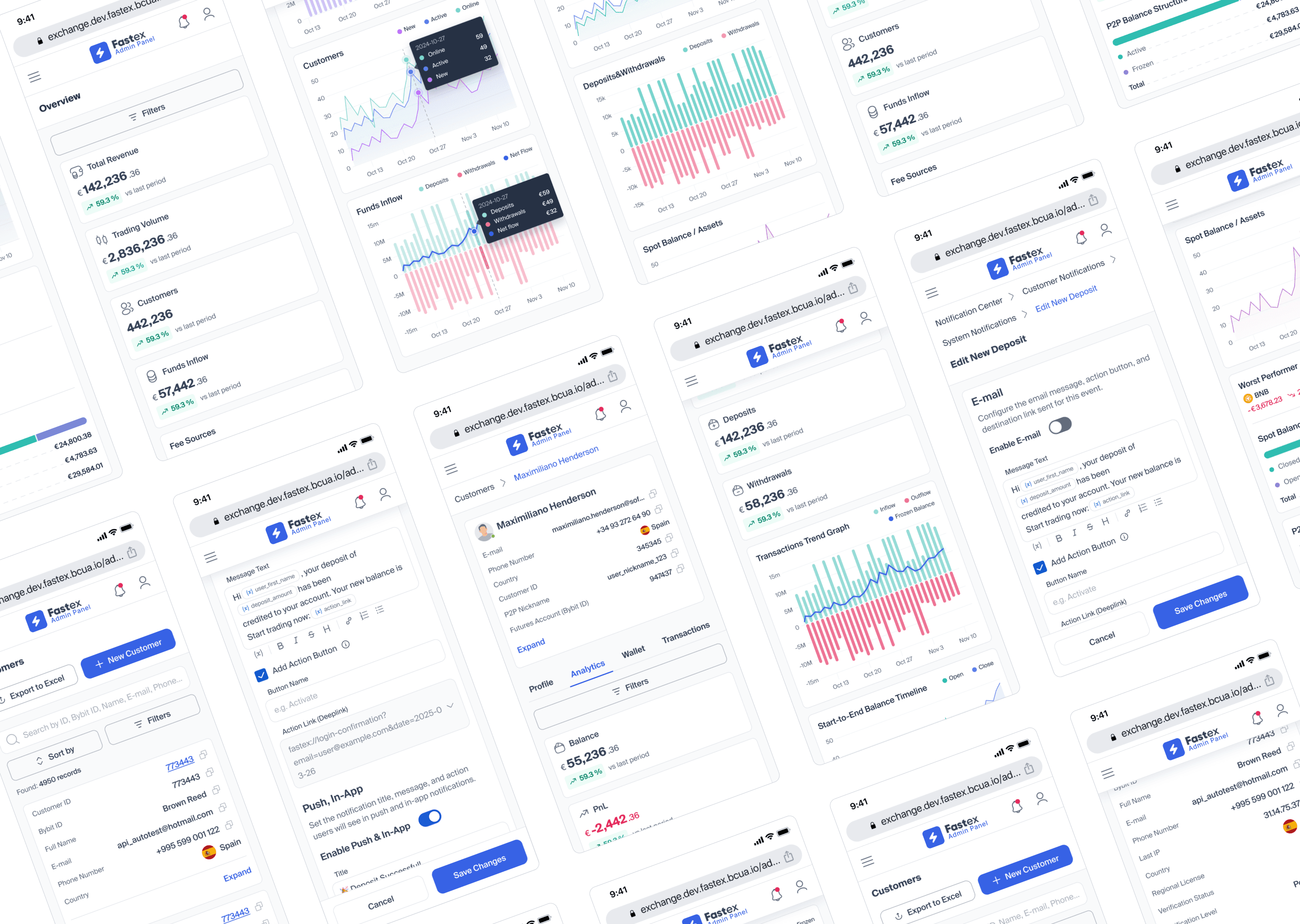
Although the back office was primarily designed for desktop use, key workflows also needed to remain accessible on smaller screens.
I designed responsive layouts across the platform, adapting dense tables, dashboards, forms, customer data, and administrative actions for mobile without simply compressing the desktop interface.
The goal was to preserve access to important information and actions while adjusting hierarchy, layout, and interaction patterns to the constraints of smaller screens.
Building a scalable foundation for the back office
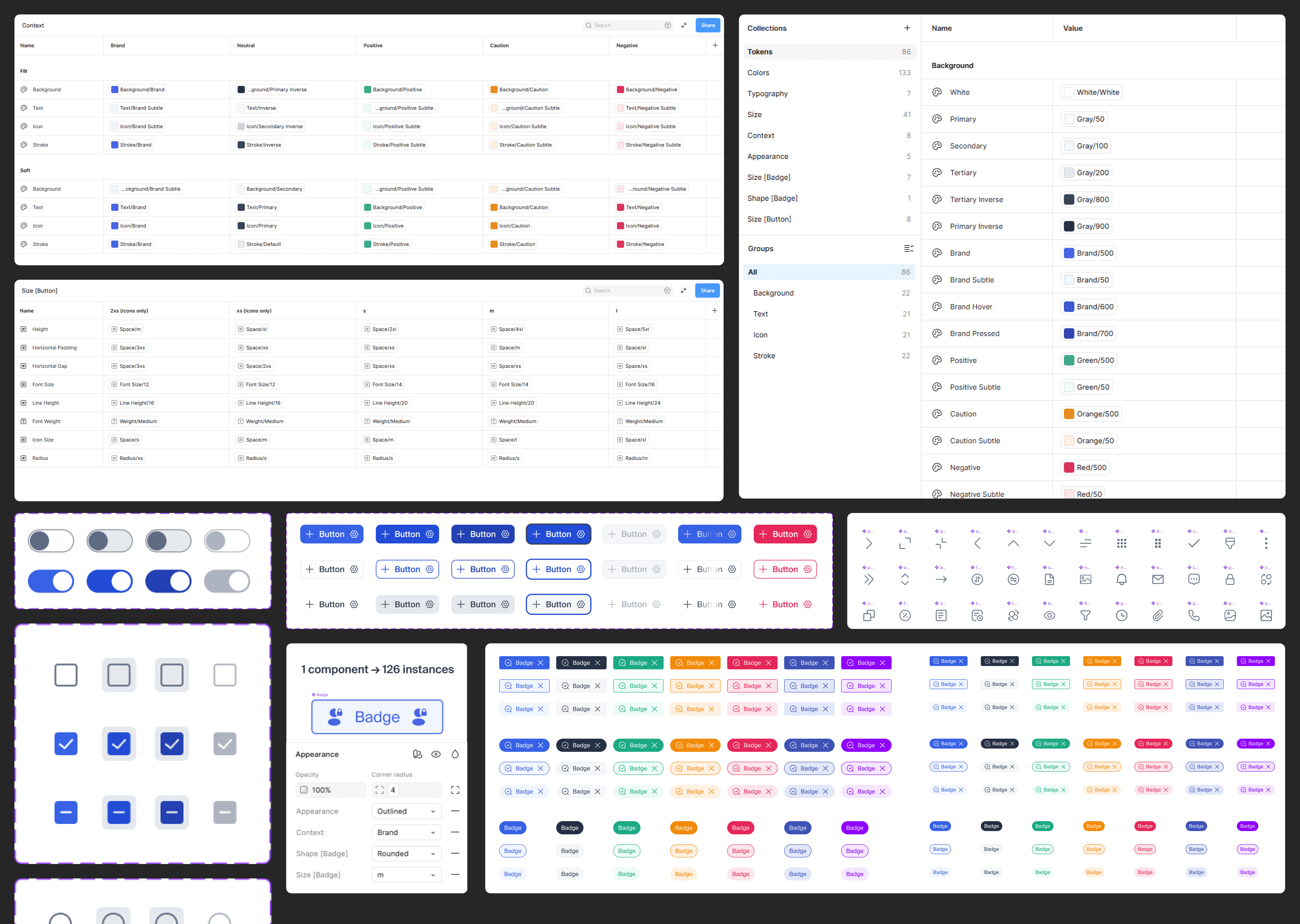
As the back office expanded across more products and operational workflows, maintaining consistency through isolated styles and one-off components became increasingly difficult.
I built the new design system around Figma variables and design tokens, defining reusable values for color, typography, sizing, component properties, and interaction states. Semantic tokens for backgrounds, text, icons, strokes, feedback states, and brand colors were mapped to underlying palette values instead of being hard-coded in individual components.
The same foundation was used across dashboards, tables, forms, customer management, and configuration-heavy workflows, making the UI more consistent and creating a scalable base for future modules.
Conclusion
What this project reinforced in my approach
Fastex reinforced how different internal products are from conventional customer-facing interfaces: success is often not about increasing engagement, but about helping people make decisions faster, reducing repetitive operational work, lowering dependency between teams, and making high-risk actions easier to understand.
It also strengthened my approach to complex systems: start from roles, entities, workflows, data relationships, and operational risks first — then use UI patterns to make that complexity manageable rather than simply exposing it on screen.
